 Digital edition · illustrated view
DF.026 · Collections and Craft · First edition
The Lapidary Process Book
When two pieces come from the same rough, record which cuts, abrasives and polishing stages each one received. Link the finished or stopped piece to its source and retain the earlier entry when work is revised.
- Edition
- First edition, 2026 · v1.0
- Page size
- A4 landscape297 × 210 mm
- Cover options
- 5
- Files
- Print PDF
- Low-Ink PDF
- Fillable PDF
- Tablet PDF
- Interactive
- Available soon, with the Interactive and Complete Editions
What this edition lets you do
- Trace a piece to its source
- Link rough, slab, preform, sibling pieces and retained offcuts.
- Record each stage
- Add cuts, equipment, abrasives and polishing results as the piece changes.
- Record rework or stopped work
- Add the later result while retaining the earlier entry.
For example Two cabochons come from one slab, and only one takes the intended polish. Separate Piece IDs let you compare their cuts, sanding stages and abrasives while retaining the shared source.
About this edition
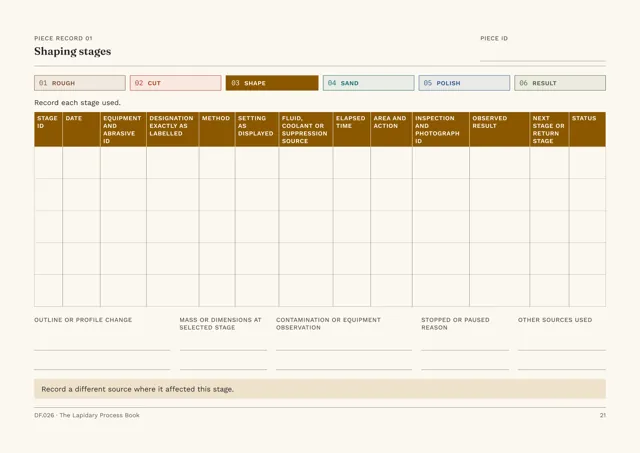
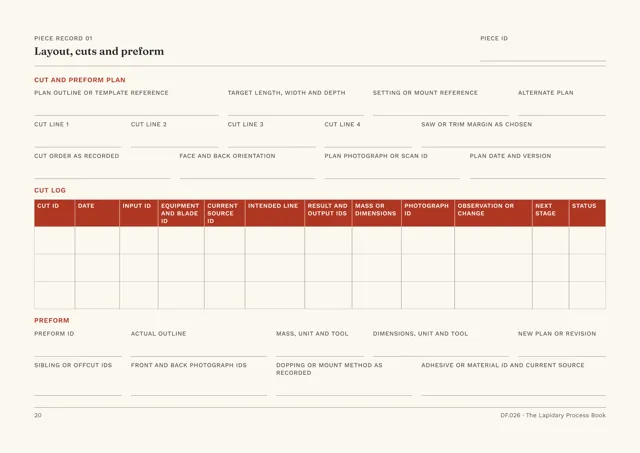
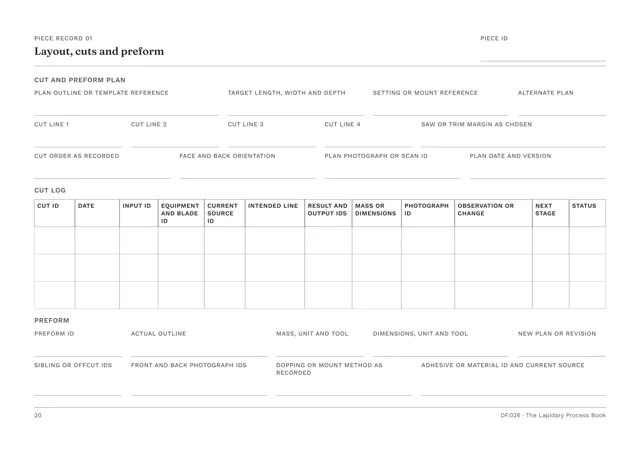
The Lapidary Process Book is for cabochons, freeforms, polished tablets and small polished specimens. Each piece gets an eight-page Piece Record that follows it from source rough through orientation, cuts and preform, shaping, sanding, polish and rework to the finished piece and photographs.
Each piece has its own ID and remains linked to the rough or slab it came from. Sibling pieces and retained offcuts are recorded against the same source.
Registers for equipment, saws and blades, wheels, laps, abrasives and polishes record what was used at each stage.
Link each piece to its source rough, cutting stages, abrasives and rework
- Record each stage of work
- The cut log, margins, preform, shaping, sanding, polish and time are recorded with the abrasive and equipment used.
- Trace a piece to its source
- Source rough, slab, preform, sibling pieces and retained offcuts are linked on the material history page.
- Compare pieces and stages
- The process comparison page places selected observations from different pieces or stages side by side.
- Record stopped work and rework
- Each outcome is recorded separately and the earlier entry remains in the record.
- Record the finished piece
- Add finished measurements, retained mass, photographs, current location and the summary of time, material and private costs.
- Record source wording and check dates
- Material names and localities are entered as supplied by the seller or source. Workshop, equipment and safety sources are listed with the check date.
Who it is for
- People cutting cabochons, freeforms, tablets or small specimens from rough, sections, slabs or preforms.
- Cutters working on several pieces from one rough who need to distinguish sibling pieces.
- Cutters comparing a successful, stopped or reworked piece with the stages recorded for it.
See a completed example
Mira Shah, Tideglass Workshop, Bristol
Completed example · Fictional information
From 7 February to 18 August 2026, four pieces are cut from four different roughs. One piece, MS-P044, is stopped at 14:26 on 12 June, returned to planning and finished as a reworked piece, with the first attempt retained. A sibling piece is left unworked, and another piece is planned but not yet cut.
What you do
- For uncut rough, open the Rough & Slab Record and add a Source ID and the material name as sold or reported.
- For a selected section, slab or preform, open the Single Piece Record and add a Piece ID, Source ID and intended output.
- Complete the eight Piece Record pages as the piece changes.
- Use Additional Piece Records for further pieces from the same rough.
- Record each bench session on the Bench Session Card.
- Record stopped work and rework as separate outcomes.
In use
In each format
- Print PDF
- Full-colour pages for A4 landscape printing.
- Low-Ink PDF
- Printable A4 landscape pages with reduced solid fills.
- Fillable PDF
- Fields for typing in a PDF reader. Tested in Chrome and Firefox.
- Tablet PDF
- 102 pages for handwriting and drawing in a PDF annotation app, with companion records in the same file.
- Interactive Edition
- Available soon. The same lapidary record for browser completion.
Interactive Edition · Available soon
Type into the pages in your browser. Add continuation pages where offered and use the picture areas supplied by the title.
The project shows Saved after it is stored on the device. Save a backup to continue on another supported browser or device. Export a reading PDF or fillable PDF.
Scope
The book records the work, material descriptions and sources you enter. Use current material, equipment and workshop information for identification, equipment operation and safety.
The edition covers cabochons, freeforms, polished tablets and small polished specimens.
Questions
- What kinds of work does it cover?
- Cabochons, freeforms, polished tablets and small polished specimens cut from rough, sections, slabs or preforms.
- How are several pieces from one rough recorded?
- Each piece has its own ID and links to the same source rough. Sibling slabs, sibling pieces and retained offcuts are recorded against it.
- How are abrasives and compounds recorded?
- Enter the abrasives, compounds, equipment and source information used for the stage.
- Which format should I use?
- Print for paper, Low-Ink for reduced solid fills, Fillable for typed PDF entries or Tablet for handwriting and drawing with a stylus. An Interactive Edition, for completing the record in your browser, is available soon.
- Is the completed example included?
- Yes. The people, sellers, places, costs and pieces are fictional.
Version history
Updates within version 1 are included. Each one appears in your library with a note of what changed.